The online accounting program mKsiegowa.pl provides, in addition to its basic functionality, tools that support the economic analysis of an organisation. The manager dashboard is not only a convenient tool for instant access to the basic data needed for current analysis and financial reporting, but also lets you set reminders about important events.
Configuring the reminders table
The reminders "widget" can be configured on any tab in the Dashboard Settings.
In the settings you can specify the position of the reminders table on the selected tab. Example of how reminders are displayed on the dashboard:
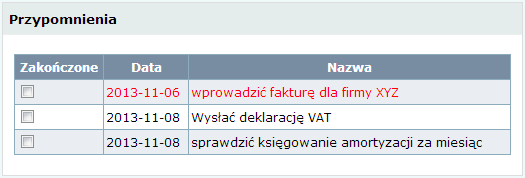
Actions whose deadline has already passed are marked in red. When you click in the Completed column, the reminder disappears from the list. It will appear again if it is configured as recurring.
Configuring reminders
Reminder configuration is accessed in the Setup -> Reminders Setup module.
The configuration screen is divided into 2 main parts:
- the upper part displays the reminders set earlier; for each reminder you can:
- delete it using the
 icon
- modify it using the
 icon
- delete it using the
- the lower part of the screen contains a form for adding new reminders
In the program, the elements (tables, charts) placed on the dashboard are called "Widgets".
Adding new reminders
You can add a new reminder to the list in any part of the screen. Finally, click the Add new button.
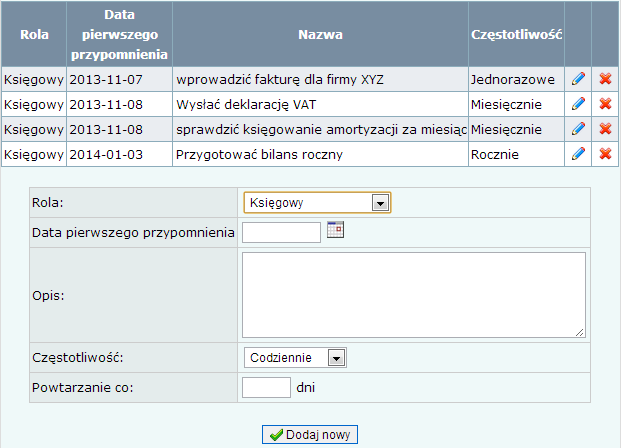
Meaning of the form fields:
- Role - the reminder will appear for all users who have the profile selected in this field assigned
- Date of first reminder - the reminder date, for a one-off reminder; the date of the first reminder, for recurring reminders
- Description - the text displayed
- Frequency:
- Daily
- Weekly
- Monthly
- Yearly
- One-off