In today’s fast-paced digital world, paying for services online should be quick, easy, and secure. That’s where imoje comes in—a modern online payment system designed to make transactions smooth and hassle-free. Since the beginning of 2025 you can use this method for mksiegowa subscription payment.
Why we choose imoje for Payments?
1. Fast and Convenient Transactions
With IMOJE, transactions happen in real time, so you can pay for the subscription instantly and renew access to mksiegowa without delays.
2. Multiple Payment Methods
IMOJE supports various payment options, depending of the bank selected:
- Debit and credit cards
- Bank transfers
- BLIK (a popular instant payment method in Poland)
- Digital wallets
This flexibility makes it easy to choose a preferred way to pay, making the payment more convenient.
3. Secure Payments Every Time
Security is a top priority when making online transactions. IMOJE uses advanced encryption and fraud detection technologies to ensure that your payment details are always safe. With 3D Secure authentication, you can have peace of mind knowing that your transactions are protected against unauthorized access.
4. User-Friendly Experience
IMOJE offers a simple and intuitive interface, making it easy to complete payments in just a few clicks. Plus, it works smoothly on both desktop and mobile devices, so you can pay anytime, anywhere.
How to Use imoje?
Using imoje is straightforward:
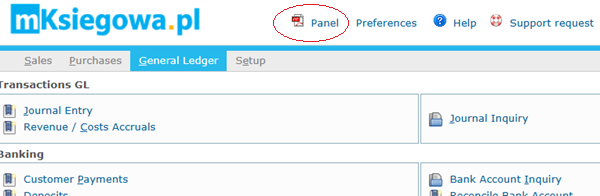
- Go to Panel link in the program.
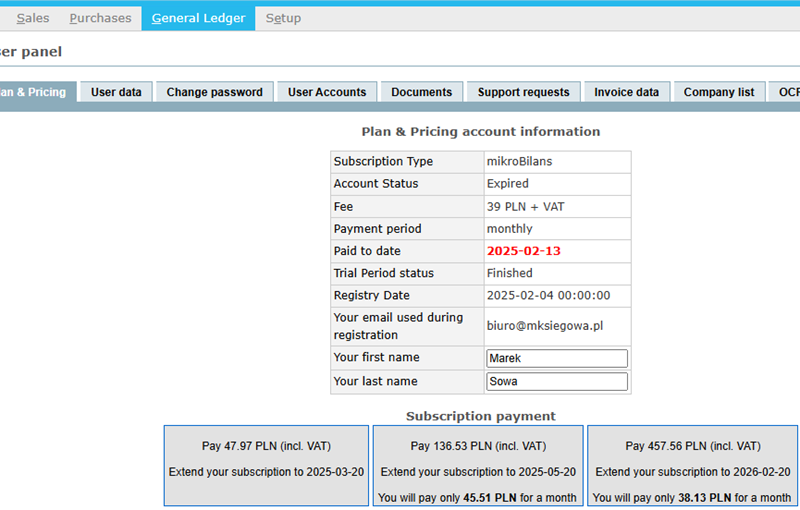
- Check if the payment amount is correct. Click on the preferred option (3 options may be available: monthly, quarterly or annual payment - only if you'ev chosen monthly payment in the beginning)
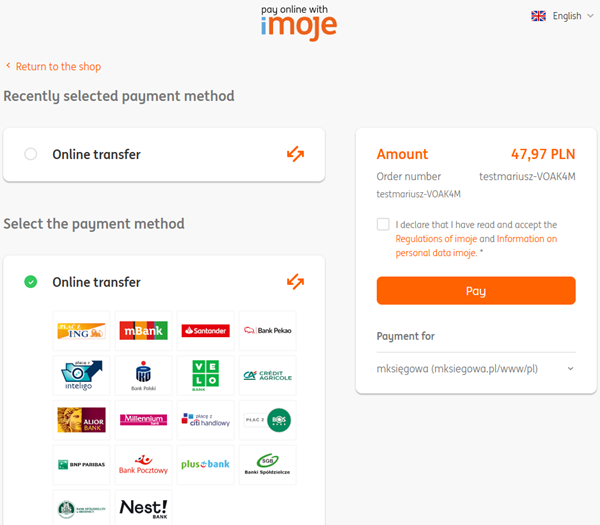
- The program transfers you to IMOJE payment.
- Select your bank.
- Follow the prompts to complete the payment securely.
- Receive confirmation on email after the payment is complete (normally it takes several minutes)
- If the program was still active you can continue working in it.
- If the program was already clocked, log off and log in again so it is re-activated.