The online accounting program mKsiegowa.pl provides, in addition to basic functionality, tools supporting the economic analysis of an organisation. The manager's dashboard is a convenient tool for immediate access to the basic data needed for ongoing analysis and financial reporting.
How to enable the dashboard
The manager's dashboard in the mKsiegowa.pl program is tied to a graphic theme ("skin") called dashboard. You can enable the graphic theme in the Display Settings option at the top of the screen.
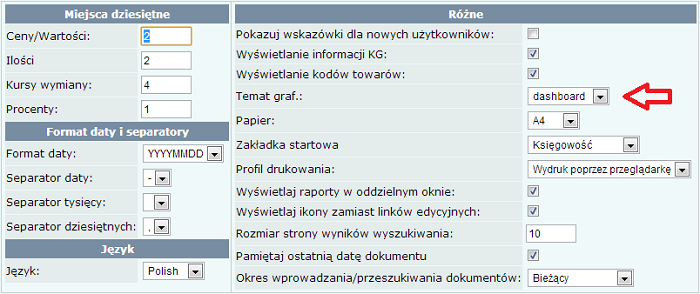
Dashboard configuration
Manager's Dashboard configuration is accessed in the Setup -> Dashboard Settings module.
The configuration screen is divided into 2 main parts:
- the upper part displays the charts and tables set up earlier; for each previously set element you can:
- delete it using the
 icon
- modify it using the
 icon
- delete it using the
- the lower part of the screen contains a form for adding new elements to the dashboard
In the program, the elements (tables, charts) placed on the dashboard are called "Widgets".
Adding new dashboard elements
A new element can be added on any tab of the program menu. In the first field you can select the tab:
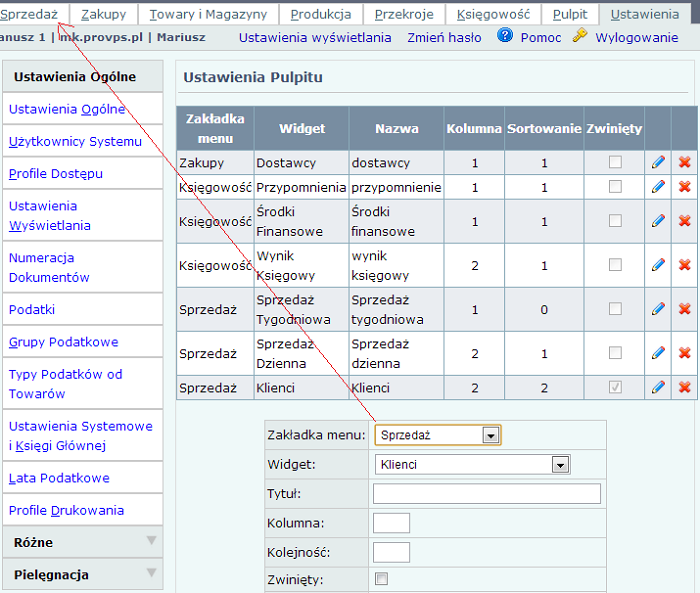
In the next field you select a "widget" from the list:
- Customers - the widget calculates total sales for a selected number of customers, ranking customers by sales value
- Overdue invoices - a table of unpaid sales invoices
- Daily sales - total daily sales value for a given number of weeks back
- Weekly sales - total weekly sales value for a given number of weeks back
- Suppliers - the widget calculates the total purchase value for a selected number of suppliers, ranking them by total value of deliveries
- Purchase invoices - a table of unpaid purchase invoices
- Items/Services/Products/Templates - a table or chart with the total sales value by items, services or products
- Financial Resources - a table presenting the current balance of all bank accounts (cash, banks, advance settlements)
- Daily Balances - a chart or table presenting the daily balances of a selected bank account (most often cash or bank)
- Bank Transactions - a table containing transactions on a selected bank account (most often cash or bank), over a given period of time
- Accounting Result - a table or chart presenting the current financial result as well as assets and liabilities
- Dimensions - a table or chart presenting the value of turnovers on individual dimensions or projects
- Reminders - a list of matters to be dealt with in the program; the list can appear on a specified tab; Reminder configuration is a 2-step process:
- by adding the widget on a specified tab you cause a window to appear in which reminders will be displayed;
- in the Days ahead field you set how many days before the date specified in the reminders they should appear in the widget window;
- in the Setup module there is the Reminders Settings option; there you enter all reminders.
In the next fields you can configure:
- Title - the widget name displayed on the screen
- Column in which the widget will appear on the tab
- Order in which the widgets will be arranged in the tab column, starting from 1
- Collapsed - if selected, the widget will be collapsed by default and you can click the arrow in the upper right corner of the widget to expand it; a useful option when there are many widgets on a tab
The remaining parameters depend on the type of widget.