

Supplier transactions
To see transactions related to suppliers in the online accounting program mKsiegowa.pl (documents related to the purchase), you need to go to the module Purchases → Supplier Transactions Inquiry.
Importing Documents from KSeF
If the KSeF module is enabled, the program should display the KSeF tab.
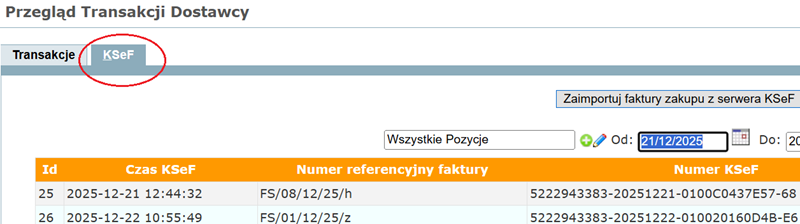
More information about importing and posting KSeF invoices.
Searching Document
In the menu you can:
- search and view (document type selection field):
- print documents
- modify purchase invoices
- enter adjustments to purchase invoices
You can modify the previously entered purchase invoice by searching for the document and clicking the icon  on the right side. You will find more information in Modify Purchase Invoice.
You can enter a purchase invoice adjustment by clicking the icon  .
.
It is possible to print a document by clicking the icon  .
.
After clicking the button  below the search results, it is possible to generate data for an Excel spreadsheet.
The program presents also overdue documents.
Setup
You can set the number of displayed documents on the screen in Preferences at the top of the screen.
Note: Purchase invoices are filtered by date of issue. You can view the accounting documents for these invoices in Journal Inquiry by the Invoice Date, i.e. the Invoice Receive date.
E-documents
If you purchase a subscription with the additional e-documents option, the program allows you to preview the attached scans.
For this purpose you need to:
- find the invoice for which you want to view the attachment
- click the document posting preview icon
- click the document posting preview link; the link only appears if the document has been linked previously
Viewing and adding attachments is also available in the module Setup → Attach Documents.